Skip to content

The Best Zendesk Alternative for AI-Powered Customer Support

Looking for a Zendesk alternative? SiteSpeakAI offers AI-powered chat from $29/month flat (not per seat), with live chat and no expensive AI add-on. Compare features and pricing.

Last updated: July 15, 2026

✓ No credit card required

TL;DR

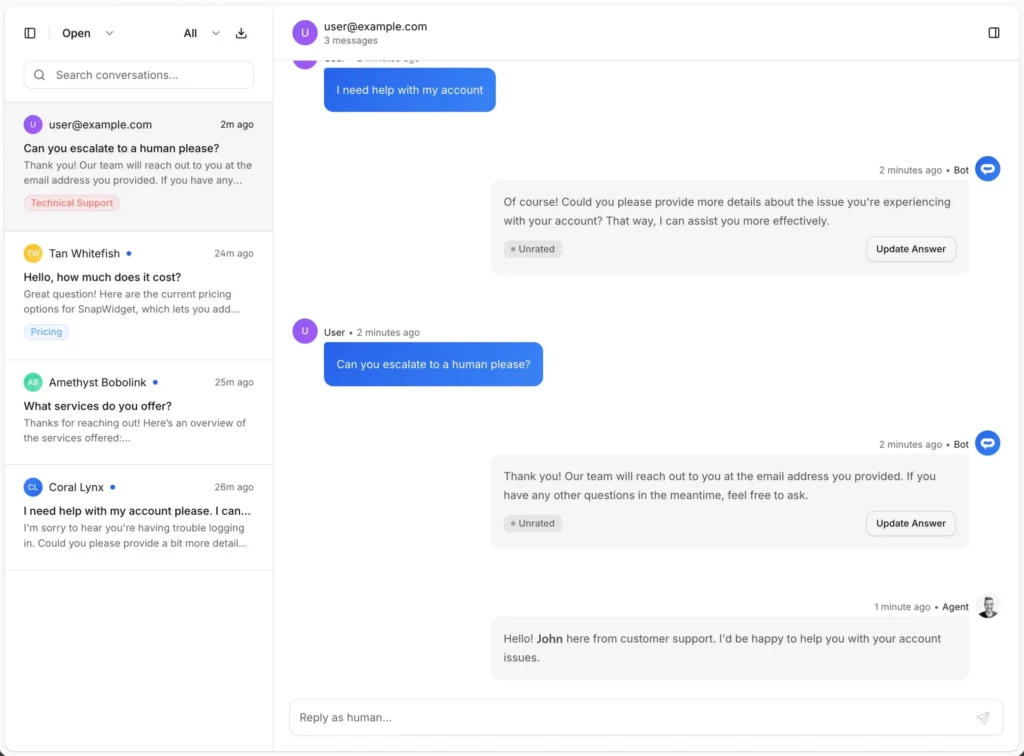
Zendesk charges $55/agent/month for Suite Team plus another $50/agent/month for the Advanced AI add-on. SiteSpeakAI offers unlimited AI conversations from $29/month flat, regardless of team size, with live chat, human escalation, and the ability to connect to your own APIs and databases included.

The best Zendesk alternatives, ranked

We compared the top Zendesk alternatives on price, live chat, human handoff, and AI model choice. Here is how they stack up.

1

SiteSpeakAI BEST OVERALL

Free plan, built-in live chat and human handoff, model choice across OpenAI, Anthropic, Google, and xAI, plus free sentiment analysis and the ability to connect your own API or database. From $29/mo.

2

Full customer-support suite with Fin AI, billed per seat so costs climb with team size. From $50/seat/mo.

3

Website- and doc-trained chatbot with steep pricing tiers. From $124/mo.

4

Enterprise-only chat with recent multi-week outages and an uncertain roadmap post-acquisition. Custom pricing.

5

Low entry price, but live handoff needs an external helpdesk and API access is a paid add-on. From $19/mo.

Zendesk vs SiteSpeakAI: watch the comparison

A quick walkthrough of pricing, features, and how to switch.

Why people look for Zendesk alternatives

Zendesk is a powerful help-desk, but teams looking for AI-powered chat often find the pricing and complexity hard to justify.

Per-agent pricing and paid AI add-on

A five-agent Zendesk team on Suite Team plus Advanced AI costs $525/month minimum before ticket volumes or integrations. SiteSpeakAI is $29/month flat for the whole team.

AI built on top, not in

When the AI cannot answer a question, Botpress has no native way to hand off to a human agent. SiteSpeakAI includes built-in live chat and escalation so your visitors always get the help they need.

Complex setup for simple chat needs

Updating Botpress bots often requires developer time to modify flows and retrain. SiteSpeakAI auto-syncs your training sources on a schedule so your chatbot always has the latest information without manual updates.

SiteSpeakAI vs Zendesk

Compare features and see why SiteSpeakAI is the better choice

FeaturesSiteSpeakAIZendesk
Free Plan✓ Yes✖ No (14-day trial only)
PricingFrom $29/monthFrom $55/agent/month + $50/agent/month for Advanced AI
AI ModelsOpenAI, Anthropic, Google, xAIProprietary (Zendesk AI)
Chat Inbox✓ Yes, detailed✓ Yes
Live Chat✓ Yes✓ Yes
Escalate to Human✓ Yes✓ Yes
Analytics✓ Yes, detailed (Free)✓ Yes (From $89/agent/month)
Chat Insights✓ YesLimited
Sentiment Analysis✓ Yes (Free)✓ Yes (Advanced AI add-on)
API Access✓ Yes✓ Yes
Attach Files to Messages✓ Yes✓ Yes
Auto Sync Training Sources✓ Yes✖ No
Speech Recognition & TTS✓ Yes✖ No
Team Collaboration✓ Yes (From $79/month)✓ Yes (Per-seat pricing)
Page Context Awareness✓ Yes✖ No
Priority Support✓ Yes (From $79/month)✓ Yes (Enterprise plans only)

How to switch from Zendesk to SiteSpeakAI

A simple step-by-step guide to migrate without losing conversations.

1

Export your Zendesk knowledge base

List the content sources your Botpress bot referenced (URLs, knowledge base articles, documents). You will re-use the same content in SiteSpeakAI but will not need to recreate the flows.

2

Create your SiteSpeakAI chatbot

Sign up for SiteSpeakAI, create a chatbot, and paste your website URL as the first training source. The crawler indexes every page automatically.

3

Add supplementary sources

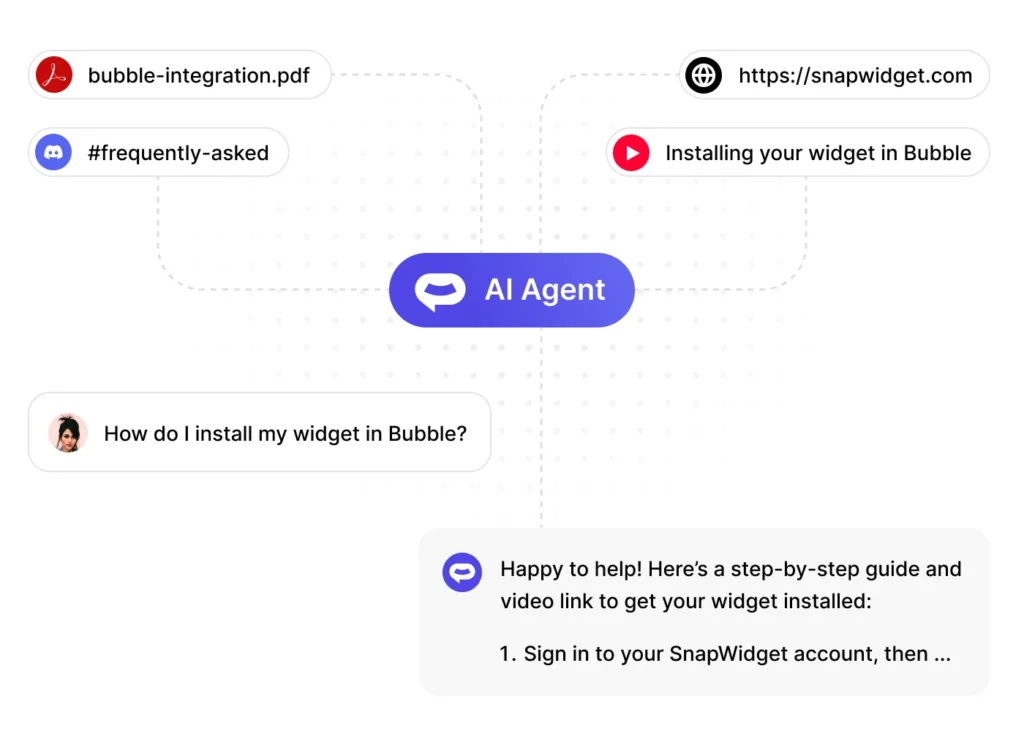
Upload the PDFs, CSVs, or YouTube content your Botpress bot used. Connect an API or database for live data. SiteSpeakAI uses RAG over all of this content instead of asking you to design flows.

4

Match your brand and tone

Customize the widget colors, avatar, and welcome message to match your Botpress branding. Set the bot persona and fallback message.

5

Swap the embed code on your site

Replace the Botpress embed with the single-line SiteSpeakAI snippet. AI chat, live chat, and the inbox all activate from the one embed.

6

Redirect your team to the new inbox

Once the new chatbot is validated, disable or archive your Botpress bot. Your team gains back the time previously spent maintaining flows and decision trees.

Connect your API or database without Sunshine or custom dev

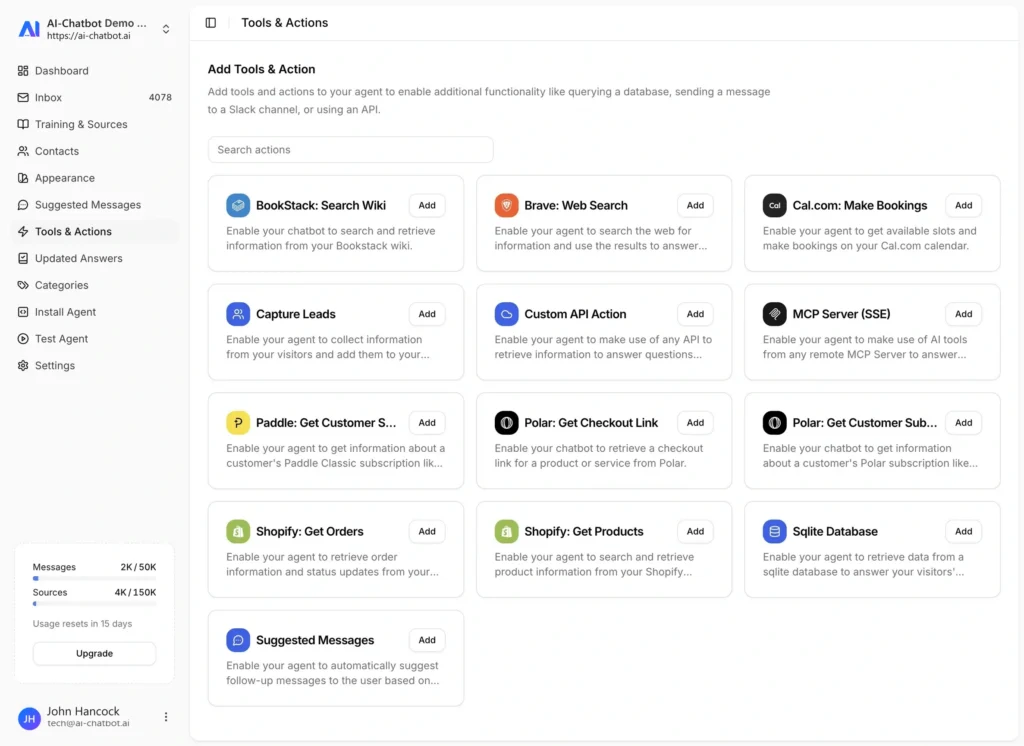
Zendesk locks deep integrations behind the Sunshine platform or custom development contracts. SiteSpeakAI lets your AI assistant connect to any OpenAPI endpoint or SQL database on any paid plan. Check order status, look up account details, or pull inventory live in a chat response. No add-ons, no per-request fees, no six-figure enterprise contract.

Will Guthrie

Digital Marketing Manager

The platform is very intuitive to set up and use. I was able to train the chatbot directly from our site maps with ease. After creating a test page and sharing it with leadership, customer service, sales, and marketing, the reaction was unanimous, everyone was impressed!

Full inbox, live chat and lead capture at a flat price

Zendesk charges per seat for inbox access and agent workspace. SiteSpeakAI includes the full inbox, live chat, and escalation on every paid plan at a flat monthly rate. Visitors can leave their details when the AI cannot help, and your team gets notified instantly. Same workflow, dramatically lower cost.

Marty Englander

Marketer

I think SiteSpeak is a super easy and extremely powerful tool to start installing into your website.

Trains on your content, not on your configuration

Use data from your website, knowledge base, support docs, text files, Youtube content, audio files, PDF’s and CSV’s to train your chatbot. Your visitors will always be able to get the right answer to their question in realtime, 24/7.

Dave Strand

Founder

I stumbled across SiteSpeak AI while having a chat with my ChatGPT. I am absolutely gobsmacked at how good it is and how easy it has been to setup. Any concerns I had have disappeared and this certainly is the way forward. I will be using SiteSpeak AI on all my websites now.

Frequently asked questions

Everything you need to know about SiteSpeakAI. Can’t find what you’re looking for? Start a free trial and see it in action.

Is SiteSpeakAI a full Zendesk replacement?

SiteSpeakAI is the best Botpress alternative for teams that want AI-powered customer support without the complexity. It offers no-code setup, trains on your existing content automatically, and includes live chat with human escalation at no extra cost.

SiteSpeakAI starts at $29/month. Botpress starts at $49/month for their Team plan. SiteSpeakAI includes live chat, sentiment analysis, and auto-syncing training sources on all paid plans, features that Botpress either does not offer or charges more for.

Yes. Botpress uses a visual flow builder that requires designing conversation paths and nodes. SiteSpeakAI takes a different approach: add your website URL and content sources, and the AI handles conversations automatically. No workflow design or coding required.

SiteSpeakAI lets your chatbot connect directly to any OpenAPI endpoint or SQL database without enterprise dev work. That means checking order status, looking up accounts, or pulling inventory live from within a chat, which Zendesk typically requires custom development or the Sunshine platform to do.

Most teams get set up with SiteSpeakAI in under 30 minutes. Add your website URLs and documents as training sources, customize the chat widget to match your brand, and embed with a single line of code. No flow migration needed since SiteSpeakAI generates responses from your content automatically.

Why teams leave Zendesk for AI-first chat

Zendesk built its reputation on ticketing. If your support flow is multi-channel email, voice, and enterprise case management, Zendesk still earns its seat. But teams who only need AI-powered chat on their website quickly notice the pricing math does not work. A five-agent Suite Team licence plus the Advanced AI add-on starts at $525/month. Adding a sixth agent adds $105/month. Adding another channel or extending the data retention window adds more.

SiteSpeakAI was built for the opposite profile: teams who want the AI to answer most questions automatically, escalate to a human when it cannot, and not pay per agent for the privilege. The whole platform is $29/month to start, with Pro at $79/month covering team collaboration and priority support.

What you lose, and what you do not

Switching from Zendesk Chat to SiteSpeakAI means giving up the deep Zendesk ticketing integration and the multi-channel unified view. If those are core to your operation, keep Zendesk for email and voice and use SiteSpeakAI purely for chat. Many teams run both.

What you gain is a chatbot that trains on your actual content instead of requiring you to build intents, entities, and conversation flows. Zendesk Advanced AI needs your Help Center articles to be shaped into Answers, with intents mapped to each one. SiteSpeakAI reads your content directly and uses retrieval-augmented generation to answer questions, with citations back to the source article.

The integration story

The most underrated difference is data access. Zendesk’s AI can pull from Help Center articles and, with Sunshine, from Zendesk-native objects. Pulling live data from your own systems (an order status service, a user account API, a stock-check endpoint) generally requires custom development on the Sunshine platform or a paid integration.

SiteSpeakAI has OpenAPI and SQL database connectors built in. Point it at a spec, describe the endpoints, and the chatbot will use them automatically when a visitor asks a relevant question. No six-figure enterprise contract, no Sunshine development, no custom apps to maintain.

Connects with the tools you already use

From your website builder to your CRM, SiteSpeak fits right in.