
- Tools & Actions
- Paddle
Agency & Reseller
Add a Paddle Subscription Action
Adding the Paddle Action
1
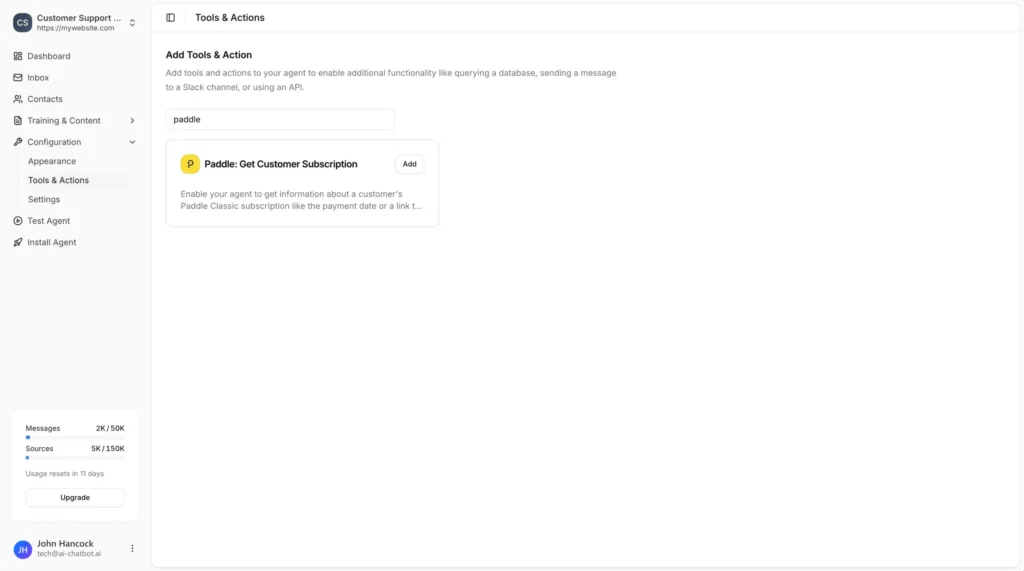
In your chatbot dashboard, go to Configuration → Tools & Actions.
2
Find Paddle: Get Customer Subscription and click Add.
Configuration
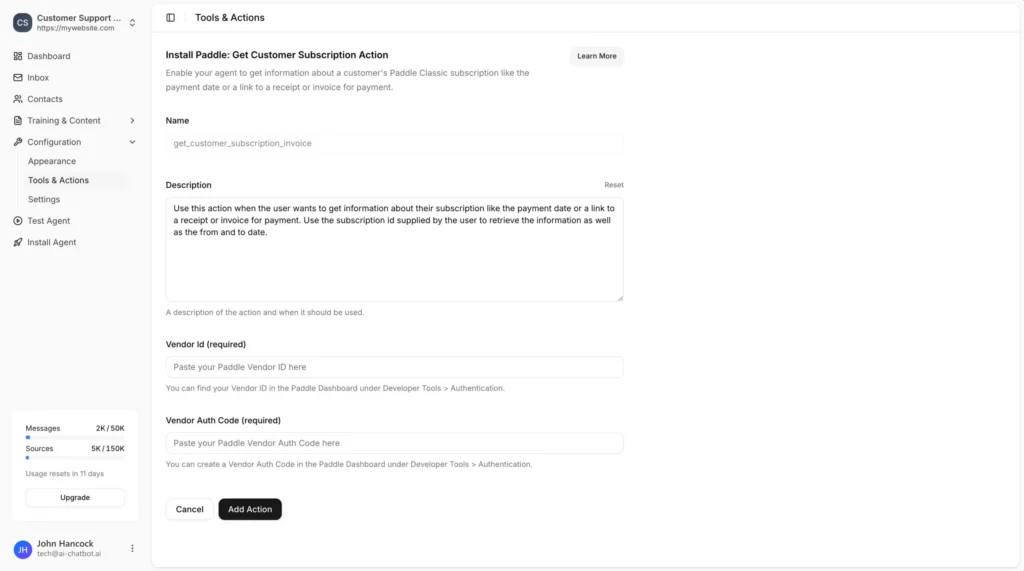
Name
Description
Example:
Vendor Id (required)
You can find your Vendor ID in the Paddle Dashboard under Developer Tools → Authentication.
Vendor Auth Code (required)
Getting Your Paddle Credentials
1
- Go to your Paddle Dashboard.
2
Navigate to Developer Tools → Authentication.
3
Copy your Vendor ID and Vendor Auth Code and paste them into AI Chatbot.
Save the Action
Click Add Action to enable the action for your AI agent.
Providing Customer Information
To look up subscription information for a specific customer, combine this action with the Identify feature so your agent has the required information to retrieve subscriptions.
Ready to automate your customer service with AI?
Join over 1000+ businesses, websites and startups automating their customer service and other tasks with a custom trained AI agent.